API Basics
This article is intended for readers with little or no programming experience. It provides a basic introduction to APIs and explains the most common concepts and configuration items you'll encounter when reading API documentation.
What Is an API?
An API (Application Programming Interface) is a way for software to expose specific functionality for external use. Instead of accessing the source code or understanding how the system works internally, you simply send the required parameters in the format defined by the API to retrieve data or perform an action.
A typical example is an API for retrieving exchange rates:
https://api.frankfurter.dev/v2/rates?base=USD"es=CNY
When you open this URL, the API returns the exchange rate from US dollars (USD) to Chinese yuan (CNY). By changing the value after base= or quotes=, you can query exchange rates for other currencies.
In this URL:
base=USDspecifies the base currency.quotes=CNYspecifies the target currency.?marks the beginning of the query parameters.- Multiple parameters are separated by
&.
If the request is successful, the API returns data in JSON format, for example:
{
  "base": "USD",
  "date": "2026-06-23",
  "rates": {
    "CNY": 7.18
  }
}
baserepresents the base currency.daterepresents the exchange rate date.rates.CNYrepresents the exchange rate of 1 USD to CNY.
This is how an API works: you provide the required parameters, the server processes the request, and the result is returned. You don't need to know how the server retrieves exchange rates or how the data is calculated and updated internally.
Components of an API Request
Calling an API is commonly referred to as making a request.
Opening an API URL in your browser is one way to make a request. In a workflow, the Send API Request node makes the request on your behalf.
A typical API request consists of the following parts:
-
Endpoint URL
The URL provided by the API service. Think of it as the entry point for accessing the API.
-
Request Method
Common request methods include GET and POST.
- GET: Typically used to retrieve data, such as looking up a phone number location or querying company information.
- POST: Typically used to submit data, such as creating a record, submitting a form, or placing an order.
Always use the request method specified in the API documentation.
-
Request Parameters
Parameters are the data sent to the server as part of the request.
For example, in the following URL, both
baseandquotesare request parameters:https://api.frankfurter.dev/v2/rates?base=USD"es=CNY -
Authentication
Many APIs require authentication to verify the identity of the caller before requests are accepted.
Common authentication methods include API keys, tokens, and
appKey + sign. Here,signtypically refers to a request signature used to verify that the request is valid and has not been tampered with. -
Request Headers
Request headers contain additional information sent with the request, such as authentication credentials and content type.
For example, some APIs require the token to be passed in the request headers. The header name is not always
Authorization; it may also betoken,X-API-Key, or another name, depending on the API specification. -
Request Body
The request body contains the data submitted to the server and is most commonly used with POST requests.
For example, when creating a new record in a third-party system through an API, the field names and field values are typically included in the request body.
In most cases, calling an API comes down to answering these five questions:
- Which API endpoint should be called?
- Which request method should be used?
- Which parameters need to be provided?
- Which authentication method is required?
- Should the parameters be placed in the URL, request headers, or request body?
Examples
The previous section introduced the basics of a GET request using an exchange rate API. The following two examples demonstrate API requests that require Header authentication and request body parameters.
Check an Account Balance: Understanding Header Authentication
Some APIs cannot be accessed simply by opening the URL in a browser because the service provider must first verify who is making the request. For example, when querying an account balance, the provider needs to identify which account the request belongs to before returning the corresponding balance.
The following example uses the DeepSeek API balance endpoint to demonstrate how authentication information is passed through the request headers.
This example is provided only to illustrate Header authentication. You do not need to register for or call the DeepSeek API to understand this section.
API Endpoint: https://api.deepseek.com/user/balance
Request Method: GET
URL Parameters: None.
Authentication: Bearer Token authentication. Your API Key must be passed in the request headers.
Header Configuration
| Header | Value |
|---|---|
| Authorization | Bearer Your API Key |
Where:
Authorizationis the header used to pass authentication information.Bearerspecifies the authentication scheme.Your API Keyshould be replaced with the actual API Key generated on the service provider's platform.
The request can be simplified as follows:
GET https://api.deepseek.com/user/balance

Authorization: Bearer Your API Key
In the workflow, configure the Send API Request node as follows:
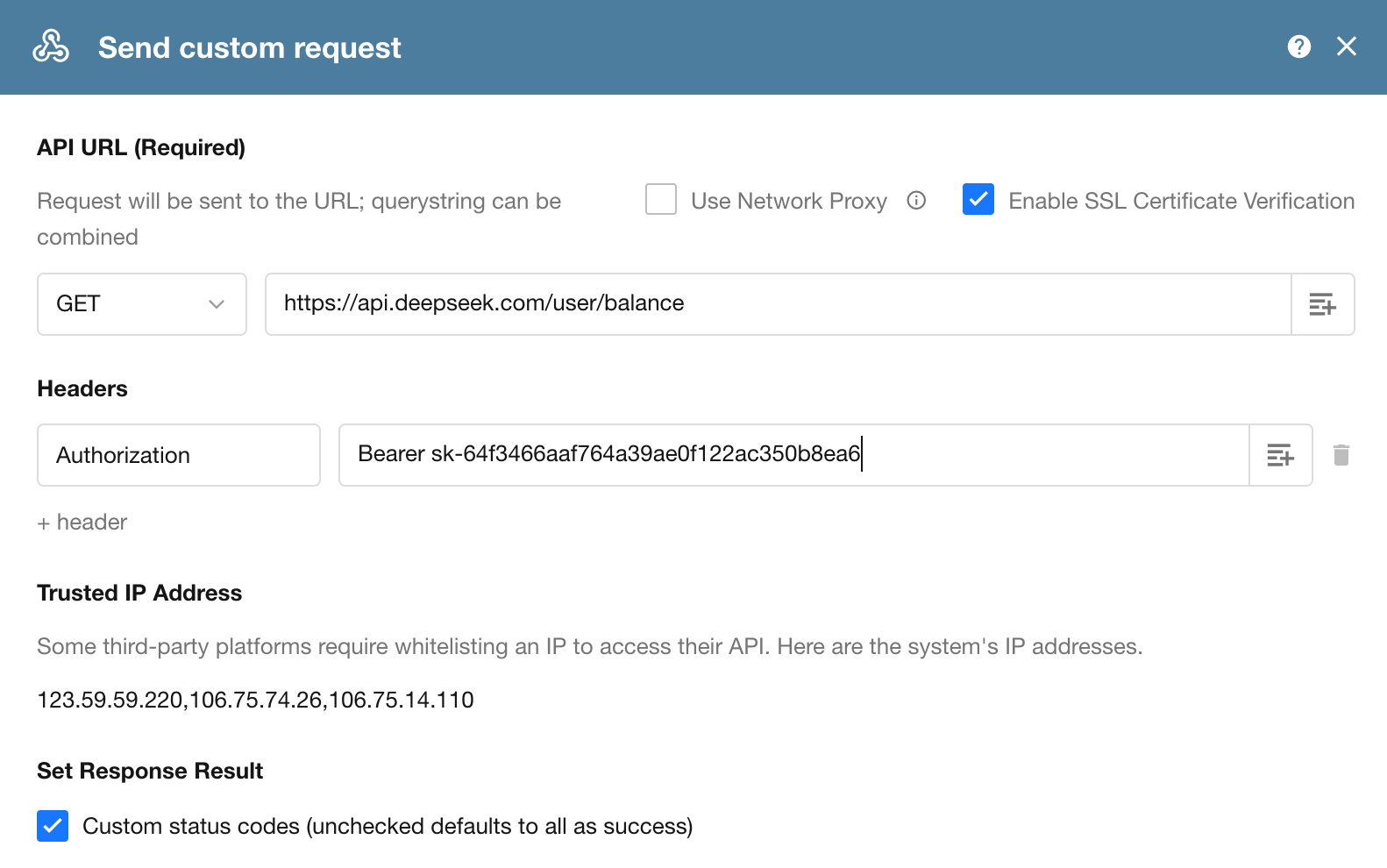
If the request succeeds, the API returns data in JSON format, for example:
{
  "is_available": true,
  "balance_infos": [
    {
      "currency": "CNY",
      "total_balance": "110.00",
      "granted_balance": "10.00",
      "topped_up_balance": "100.00"
    }
  ]
}
Where:
is_availableindicates whether the account has available balance for API calls.currencyindicates the currency, such asCNYorUSD.total_balanceindicates the total available balance.granted_balanceindicates the remaining promotional balance that have not expired.topped_up_balanceindicates the prepaid balance.
This example demonstrates that:
Some APIs have a simple endpoint and require no URL parameters, but they still cannot be accessed directly from a browser. Because these APIs require caller authentication, the required credentials must be included in the request headers.
Add a Record to a Worksheet: Understanding POST Requests and Request Body Parameters
This example uses the Worksheet API to demonstrate how to create a new record in a worksheet.
First, let's look at the Worksheet API V2 documentation:
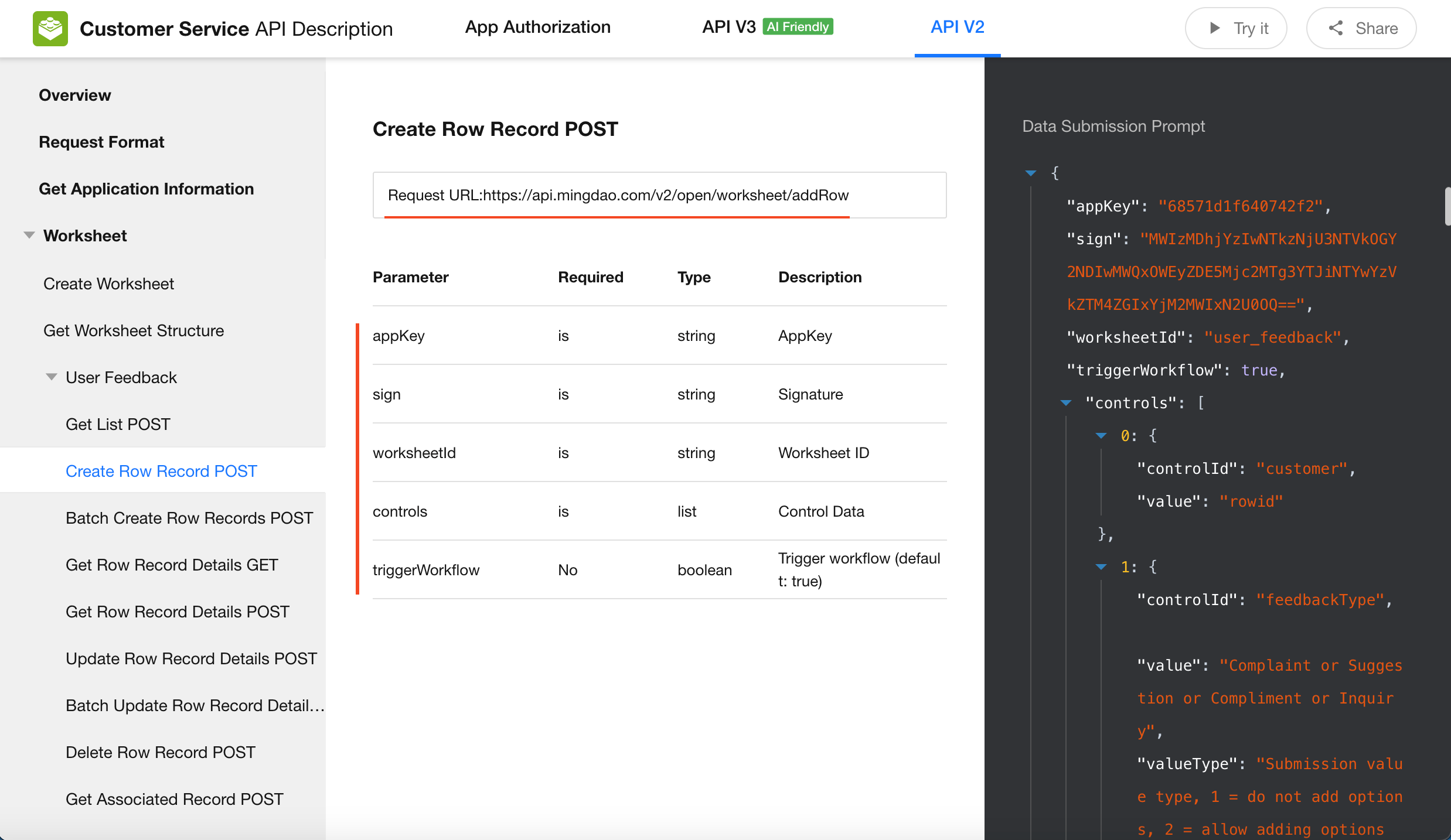
As shown in the API documentation, the request method is POST. You only need to configure the request URL and the required parameters.
Authentication: appKey + sign. These authentication parameters are submitted together with the request parameters in the request body.
Request Body Format: Raw (JSON). Parameters are organized as a JSON object and submitted in the request body. Compared with form-based requests, this format is generally more suitable for users with basic technical knowledge.
In the workflow, configure the Send API Request node by entering the request URL in the URL field and the request parameters in the Body field.
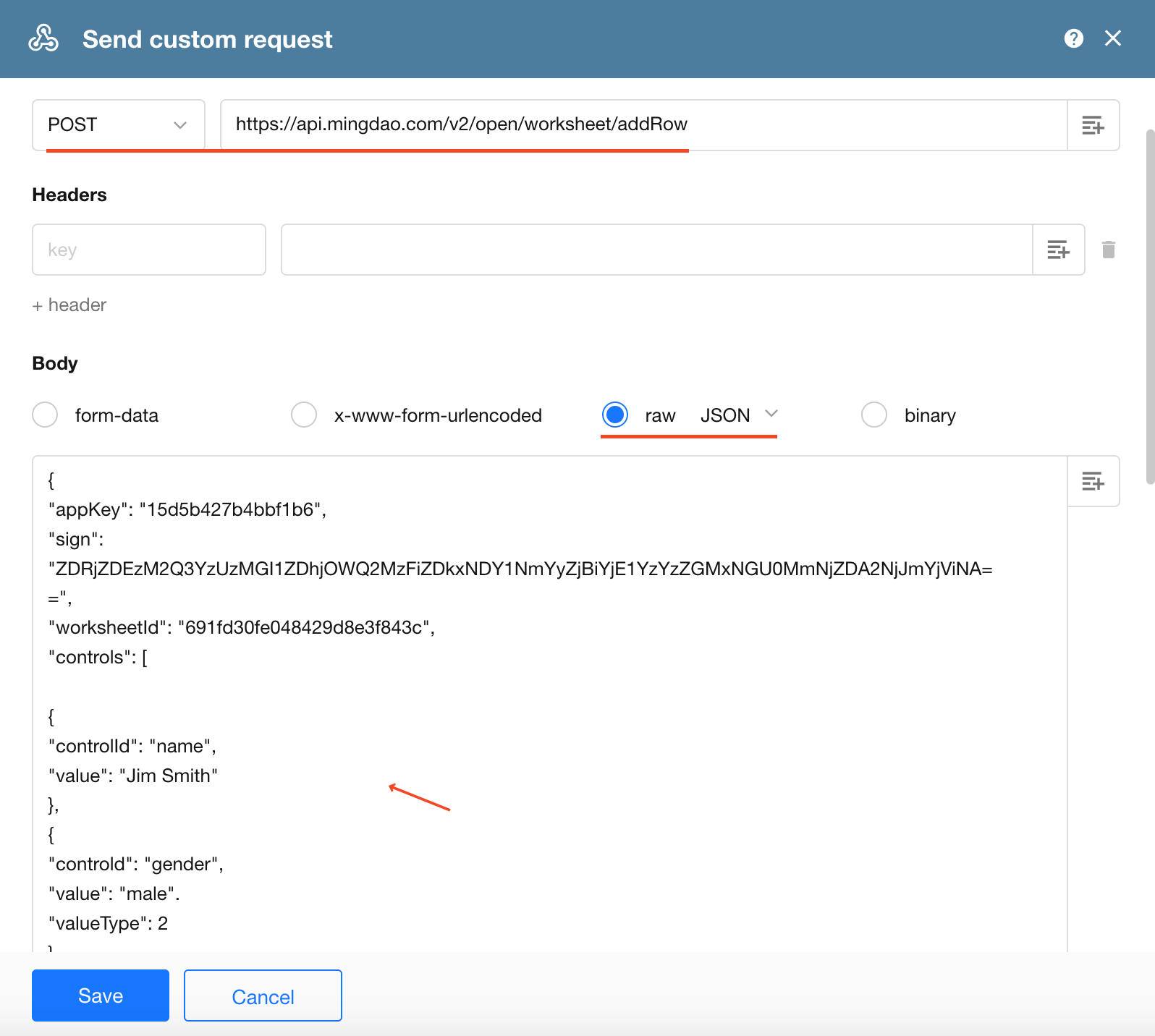
After the request is sent successfully, a new record is automatically created in the worksheet.
This example demonstrates that:
POST requests are typically used to submit data. Unlike GET requests, the data required to create a record is usually sent in the request body rather than appended to the URL.
Was this document helpful?